Follow patch decisions and escalations
What you'll learn:
- What the Décisions patch page tracks, and how it differs from Décisions CVE
- How to read the summary, the decision cards and the expiry status
- How to close a decision once the vulnerability is gone
- How an escalation reaches the person who decides, and what that person can answer
Time: ~15 minutes
Prerequisites: A maintainer, auditor or administrator account to read the page; a maintainer or administrator to close a decision. Some decisions already recorded from Conformité parc (see Fix a vulnerability on your machines).
Two pages, two questions
Repod has two places where security decisions live, and they do not answer the same question.
| Page | Decision about | Example |
|---|---|---|
| Décisions CVE | A package in the repository, before it is published | "This imported package has a High vulnerability: accept it, or block it?" |
| Décisions patch | A vulnerable package already installed on your machines | "rsync on the Rocky machine has two known CVEs and no fix: how long do we live with it?" |
This chapter is about the second one. A decision here is the written answer to "we found this on a machine, what do we do?", with a reason, an end date and a follow-up.
Step 1 — Read the summary
Open Sécurité → Décisions patch.
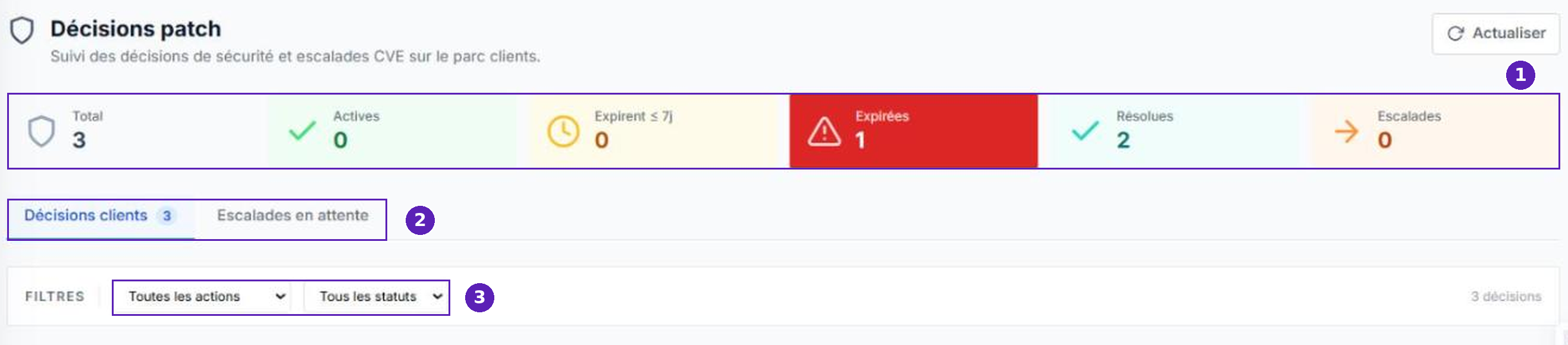
Figure 1 — The summary tiles (1), the tabs (2) and the filters (3).
The tiles (1) count the decisions recorded on machines:
| Tile | Meaning |
|---|---|
| Total | Every decision, including closed ones |
| Actives | In force, with more than 7 days left or no end date |
| Expirent ≤ 7j | They end within a week: time to plan the follow-up |
| Expirées | The end date has passed and nobody closed the decision. The tile turns red |
| Résolues | Closed: the vulnerability is gone, or the risk is removed |
| Escalades | Escalations waiting for an answer (second tab) |
The tabs (2) separate the recorded decisions (Décisions clients) from the escalations waiting for an answer (Escalades en attente). The filters (3) narrow the list by action (Risque accepté, Exception temporaire, Patch obligatoire) and by status (Actives, Expirent bientôt, Expirées, Résolues).
Step 2 — Read a decision
Each decision is a card.
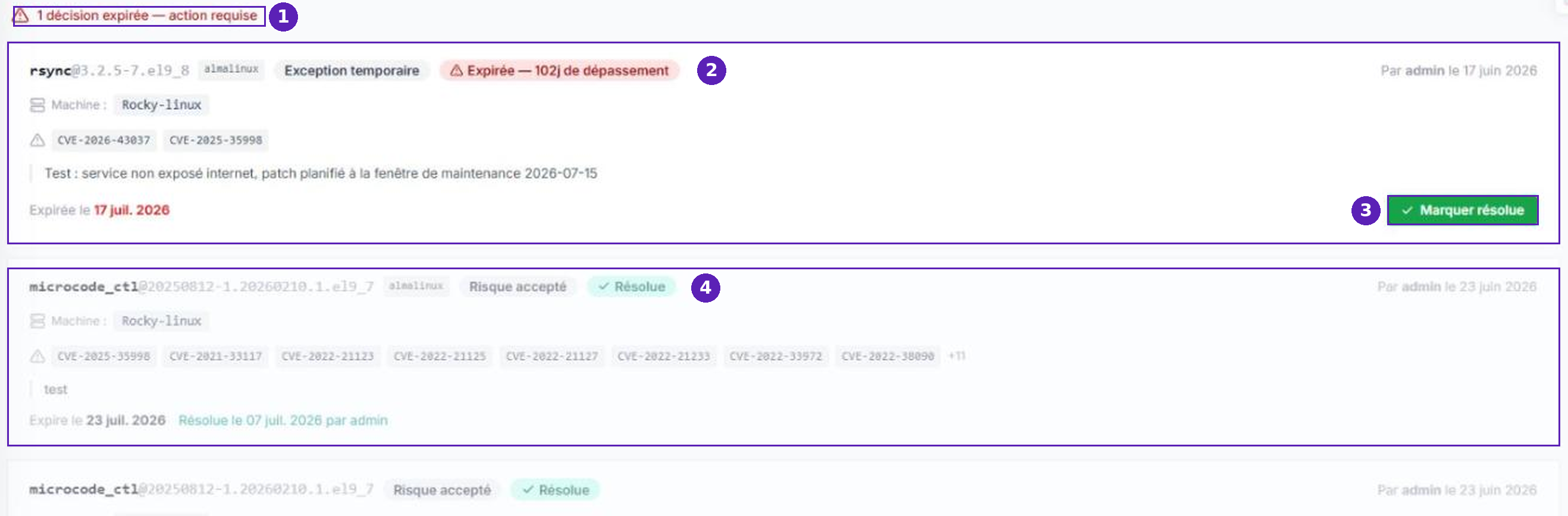
Figure 2 — The banner (1), an expired decision (2), the Mark as resolved button (3) and a resolved decision (4).
A card gives, from left to right: the package and its version, the action that was chosen, its status, then the machines concerned, the CVE identifiers, the justification and the end date. At the top right, who decided and when.
The three possible actions:
| Action | Meaning |
|---|---|
| Risque accepté | We know, we keep the package as it is |
| Exception temporaire | We accept it for a limited time, until a date (a maintenance window, for example) |
| Patch obligatoire | The package must be updated to a target version: the follow-up is tracked until it is installed |
The expiry status of a decision with an end date (2):
- Active: more than 7 days left.
- Expire bientôt: 7 days or fewer.
- Expirée — 102j de dépassement: the date passed, here by 102 days.
- A decision without an end date is permanent.
A red line at the top (1) reminds you how many decisions have expired: 1 décision expirée — action requise. An expired exception is no longer a decision, it is a risk that nobody is watching any more. Either update the package and close the decision, or record a new decision with a new date.
Step 3 — Close a decision
A decision is closed in one of two ways.
Automatically. After every successful scan of a machine, Repod checks the open decisions that concern it. A decision is closed by Repod when every machine it covers has been scanned successfully after the decision was taken and no longer shows any of its CVE on that package version. The card then reads Résolue le … par Repod (automatique), with a note: Clôturée automatiquement : la vulnérabilité n'est plus détectée au dernier scan. A machine that has been deleted from Repod counts as cleared.
Repod stays prudent: a failed scan, a machine that has not been scanned since the decision, or a scan that found no package at all closes nothing, because it proves nothing.
By hand. When the risk has been dealt with in a way a scan cannot see, click Marquer résolue (3). The card turns grey with Résolue (4), and the closing date and the person who closed it are kept: Résolue le 07 juil. 2026 par admin.
A resolved decision stays in the list as history; it is not deleted.
Reminders by e-mail
Every morning, the daily deadline check also looks at these decisions. An open decision that has expired, or that expires within 7 days, is listed in the expiry e-mail (the sla overdue template, see Customise the notification e-mails) and in the webhook, with the machines in brackets after the package name. The reminder repeats every morning until the decision is closed or renewed. Permanent and closed decisions are never reminded.
Step 4 — Answer an escalation
A technician who finds a vulnerability they cannot decide on does not have to guess. From Conformité parc, on the vulnerability, they use Escalader: they choose who must answer (a person or a group), an urgency (Normal, Urgent or Critique) and a message. The person in charge receives an e-mail built from the escalation template (see Customise the notification e-mails).
The escalation then appears in the second tab.
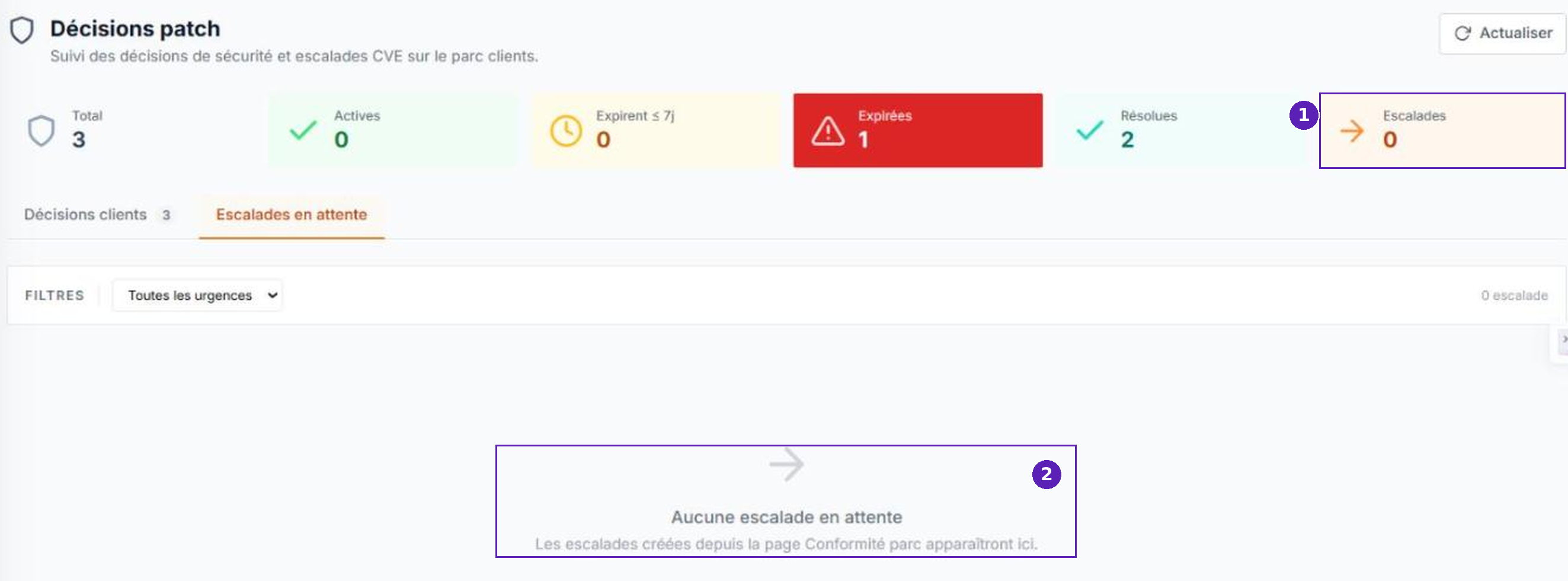
Figure 3 — The Escalades tile (1) and the list of pending escalations (2), empty on this instance.
Each escalation is a card with its urgency, who escalated and when. Click it to open the panel, where you decide. The panel offers:
- Prendre une décision: fill in a justification. It is mandatory: the three buttons stay disabled until you have written it. Describe the context and any compensating measure.
- An optional assignation (a person or a group) who is notified of your decision.
- One of three answers:
- Accepter le risque.
- Exception temporaire, with a duration in days.
- Patch requis, with a target version. Repod proposes it when a fix exists and says where it is: Déjà dans le dépôt — prêt à déployer, or Pas encore dans le dépôt local — à importer avant de pouvoir déployer. If no fix has been published upstream, you type the target version yourself.
The decision is recorded in the history and the escalation leaves the list.
A short routine
- Open Décisions patch once a week.
- Deal with the red tile first: each expired decision is either closed or renewed. The same list reaches you by e-mail every morning.
- Look at Expirent ≤ 7j: plan the update or the new decision before the date.
- Answer the escalations, starting with Critique.
What's next
- Fix a vulnerability on your machines: where these decisions come from
- Walk through a CVE remediation: the other kind of decision, on packages in the repository
- Produce the security audit report: the decision history an auditor reads