Export a software bill of materials (SBOM) for an audit
What you'll learn:
- What the SBOM page produces, and what an export contains
- How to export everything, one distribution, or a single package
- How to choose between CycloneDX, SPDX and SARIF
- What an export does and does not include, so you can answer an auditor honestly
Time: ~10 minutes
Prerequisites: A logged-in account and some published packages. The sbom feature must be part of your licence.
What the page produces
A software bill of materials is a formal inventory of the components you distribute: name, version, origin and checksum of each one. NIS2 and ANSSI audits ask for it to prove you know what you ship, and a customer may ask for it before accepting your software.
Repod builds it from the manifests it already stores for every package, so there is nothing to scan again: the export is immediate and always matches what is in the repository.
Three formats are offered:
| Format | Use it when | Content |
|---|---|---|
| CycloneDX JSON (v1.5) | The default. Your tool accepts it (Dependency-Track and most scanners do) | Components, checksums and the known vulnerabilities |
| SPDX JSON (v2.3) | An ISO/IEC 5962 document is required, for licence or procurement checks | Packages and relationships |
| SARIF (2.1.0) | You want the vulnerabilities in your code-hosting platform, not an inventory | One result per CVE and affected package |
Step 1 — Choose the format and the scope
Open Administration → SBOM / Conformité.
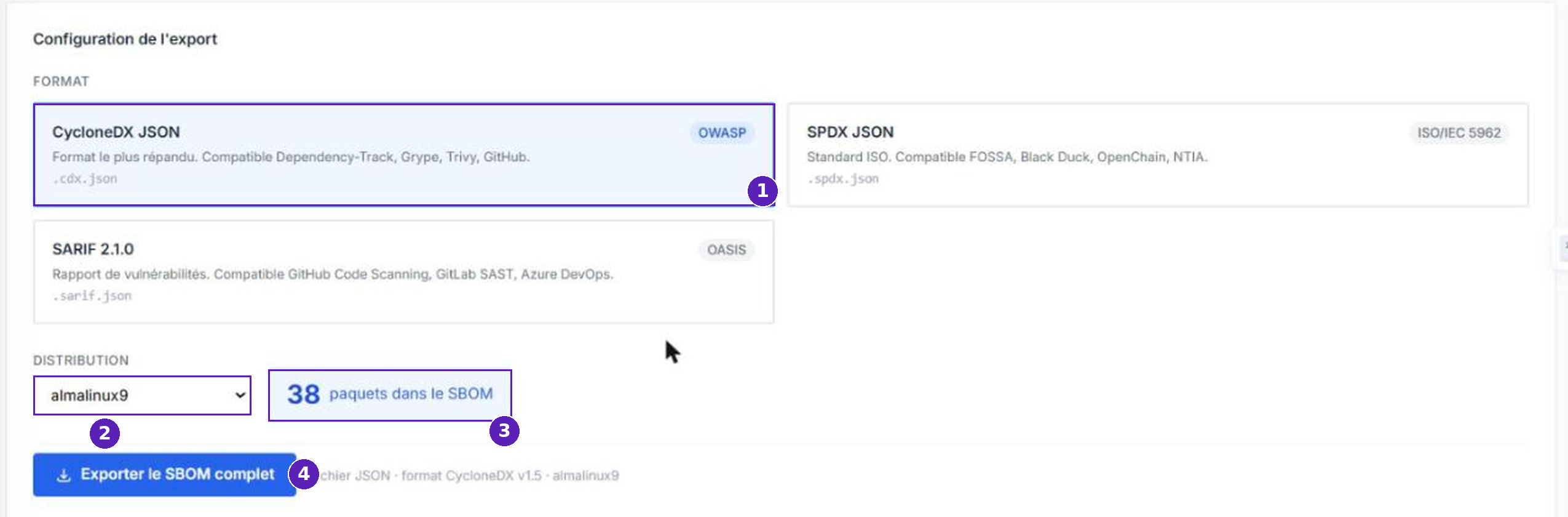
Figure 1 — Format (1), distribution (2), number of packages in the export (3) and export button (4).
- Click a format card (1). The selected card is outlined in blue.
- In Distribution (2), keep Toutes les distributions for the whole repository, or pick one (for example
almalinux9) to export only the packages published there. - The counter (3) tells you how many packages the file will contain before you download it: 38 for
almalinux9in the figure, 1210 for the whole repository. - Click Exporter le SBOM complet (4). The browser downloads a file named after the scope and the time, for example
sbom-almalinux9-20261025-074800.cdx.json.
Step 2 — Check the preview
Below the configuration, the page shows the first five components exactly as they will appear in the file.
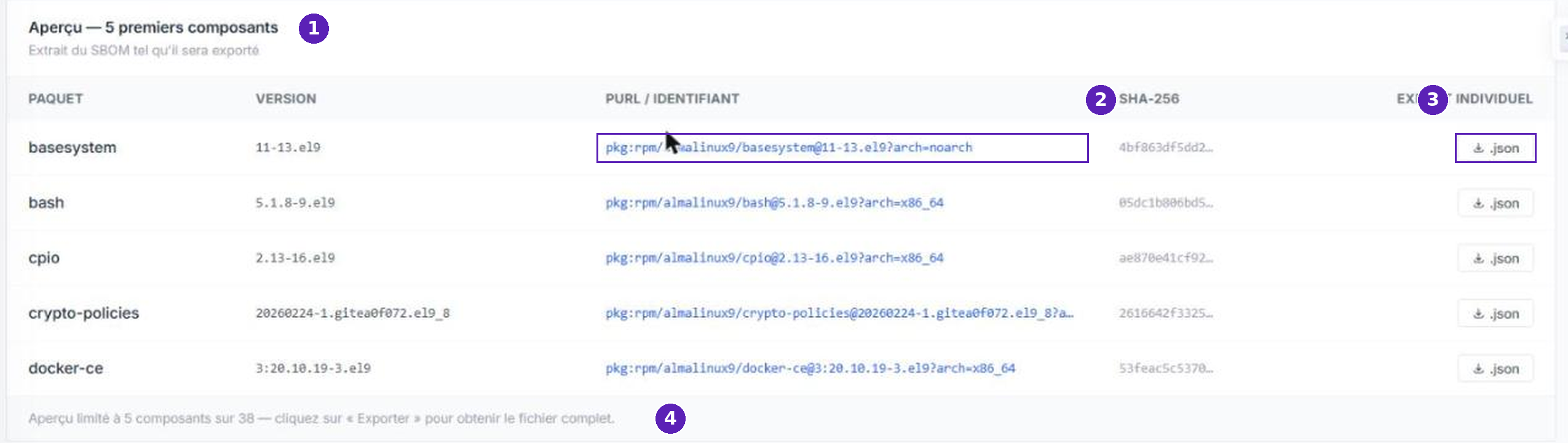
Figure 2 — The preview (1), the package URL (2), the per-package export (3) and the truncation note (4).
Each component carries a package URL (purl), the standard identifier scanners use to match a component with vulnerability databases: pkg:rpm/almalinux9/[email protected]?arch=x86_64. The prefix tells you the ecosystem (deb, rpm, apk, maven, pypi, npm, oci). The SHA-256 is the checksum of the stored file.
To export one package only, click .json at the end of its row (3). The file is named sbom-<name>-<version>-<arch>. The preview stops at five rows (4); the exported file always contains everything in scope.
Step 3 — Export the vulnerabilities as SARIF
Click the SARIF 2.1.0 card. The page changes: a SARIF file is a vulnerability report, not an inventory, so the component preview disappears.
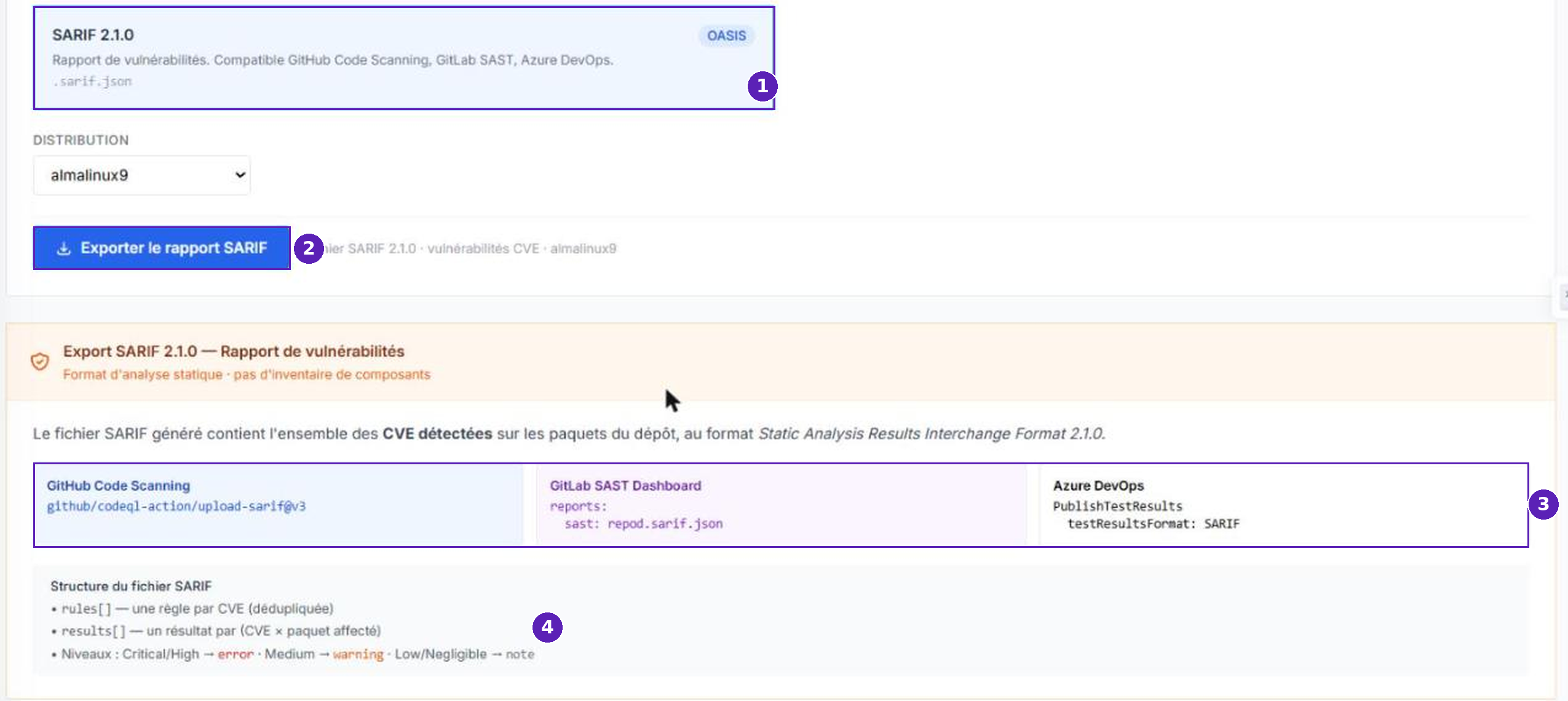
Figure 3 — The SARIF card (1), the export button (2), the three ready-to-use CI snippets (3) and the file structure (4).
The file holds one rule per CVE (deduplicated) and one result per CVE and affected package. Severities map to SARIF levels: Critical and High become error, Medium becomes warning, Low and Negligible become note. On this instance the jammy export contains 1 176 rules and 5 222 results.
The three snippets (3) show how to feed the file to GitHub Code Scanning, the GitLab SAST dashboard or Azure DevOps. Download the file in a pipeline step, then hand it to the matching action.
What an export contains, and what it does not
Read this before you send a file to an auditor.
- It is the whole inventory, not only what is published. Packages awaiting a decision, quarantined, or marked for upgrade are included. Each component carries a
statusproperty (validated,pending_review,quarantined,upgrade_required,exception), so a reader can filter. On this instance, 1 188 of the 1 210 components arevalidated. - It covers every format, not only Debian packages:
.deb,.rpm,.apk, container images, and Maven, PyPI and npm artifacts, each with the rightpurlprefix. - It describes the packages Repod stores, not the machines. For what is installed on a machine, use the machine inventory.
- Vulnerabilities in CycloneDX are the ones found at scan time, enriched with the data Repod holds. They are as fresh as the last scan and the last re-matching (see Keep your data fresh and your platform running).
- The arch filter does not apply to the full export. The
archoption exists only for the single-package export. A full export lists each package with its own architecture.
A routine for audits
Export the CycloneDX file of the distribution you ship, once a month, and keep it with your audit evidence. The file name carries the date, and the SHA-256 of every component lets you prove later exactly which bytes you distributed.
What's next
- Produce a NIS2 report and use the audit log: the compliance report you can hand over alongside an SBOM
- Keep your data fresh and your platform running: how current the vulnerabilities in an export are
- Set your security policy before the first package: the policy that decides which packages are
validated