Back up Repod and rehearse a restore
What you'll learn:
- What the Repod backup contains, and what it does not
- How to run a backup from the interface, read its integrity badge and download it
- How to schedule it without filling the disk
- How to prove a backup is restorable, without touching your live database
Time: ~30 minutes, most of it waiting for the backup to finish
Prerequisites: An administrator account, and free disk space: the archive in this chapter weighs 4.5 GB and was written in about 16 minutes.
What is in the archive
The archive is a single .tar.gz. We counted what is in the one made for this chapter:
| In the archive | Why it matters |
|---|---|
postgres.dump (689 MB) |
All relational data: users, manifests index, inventory, install jobs, decisions, drift baselines, tokens |
settings.json |
LDAP, OIDC, CVE policy, schedules, sources |
gnupg/ |
The key that signs your APT and RPM metadata. Without it, every client machine has to be reconfigured |
secrets/ |
The secrets Repod generated, including the key that signs the Alpine index. Without the first, encrypted settings cannot be read back; without the second, every Alpine client has to import a new key |
pool/ (2879 files) |
The packages themselves |
manifests/, security/, sboms/ |
Package metadata, CVE decisions and caches, stored SBOMs |
maven/, pypi/, npm/ |
The Maven, PyPI and npm repositories. Their storage is the only copy of those artifacts |
db/, dists/, conf/, rpm/, apk/ |
The APT index and its reprepro database, and the RPM and Alpine trees. Nothing regenerates them from the pool: without them apt update sees no package after a restore |
audit/ |
The audit log |
One thing is not in it: the container images (the registry's own storage, ./repos/oci/data). Back them up with your usual volume snapshots or rsync.
Step 1 — Open the page
Open Administration → Sauvegarde.
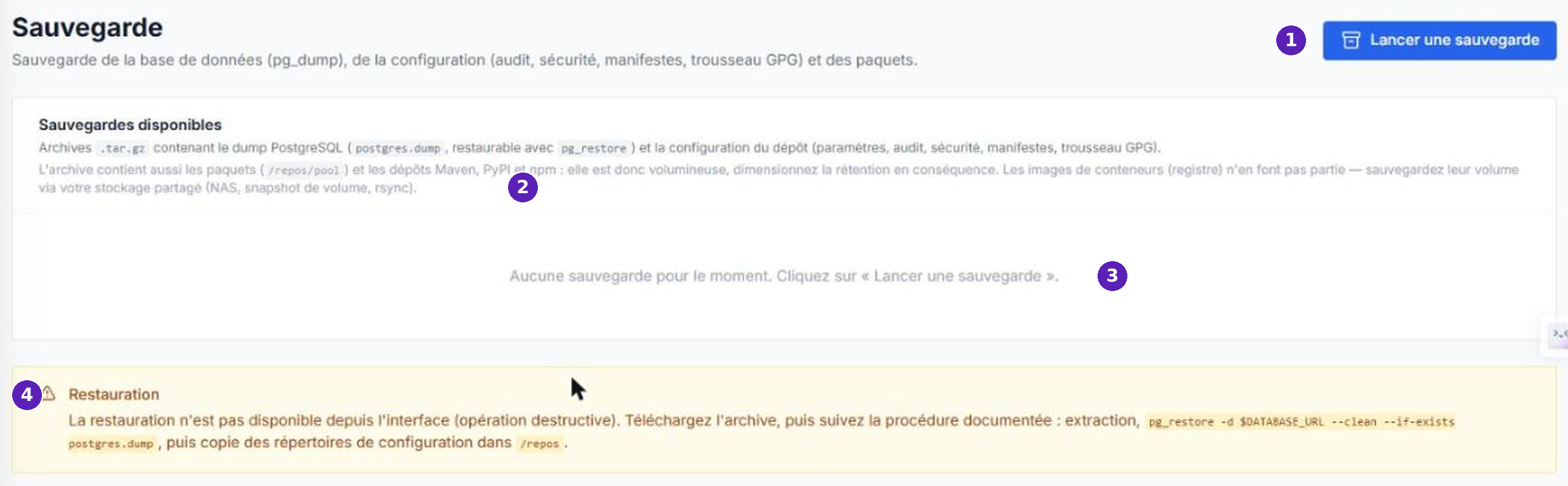
Figure 1 — The page before any backup.
- Lancer une sauvegarde. Starts a backup now.
- The note. The archive holds the packages and the application repositories, so it is large: size your retention accordingly. Container images are not in it.
- The list. Empty until the first backup.
- Restauration. The interface cannot restore, on purpose: it is a destructive operation. You restore by hand, as in Step 5.
Step 2 — Run a backup
Click Lancer une sauvegarde. The button reads Sauvegarde en cours… while it works. Here it ran for about 16 minutes, because copying and compressing 4 GB of packages is slow. Leave the page open, or come back later: the archive appears in the list when it is done.
Repod checks that the disk has room before it starts, and refuses a backup that could not fit rather than failing halfway. It also waits for a running mirror job to finish before copying the pool, so the archive is consistent.
Step 3 — Read the result
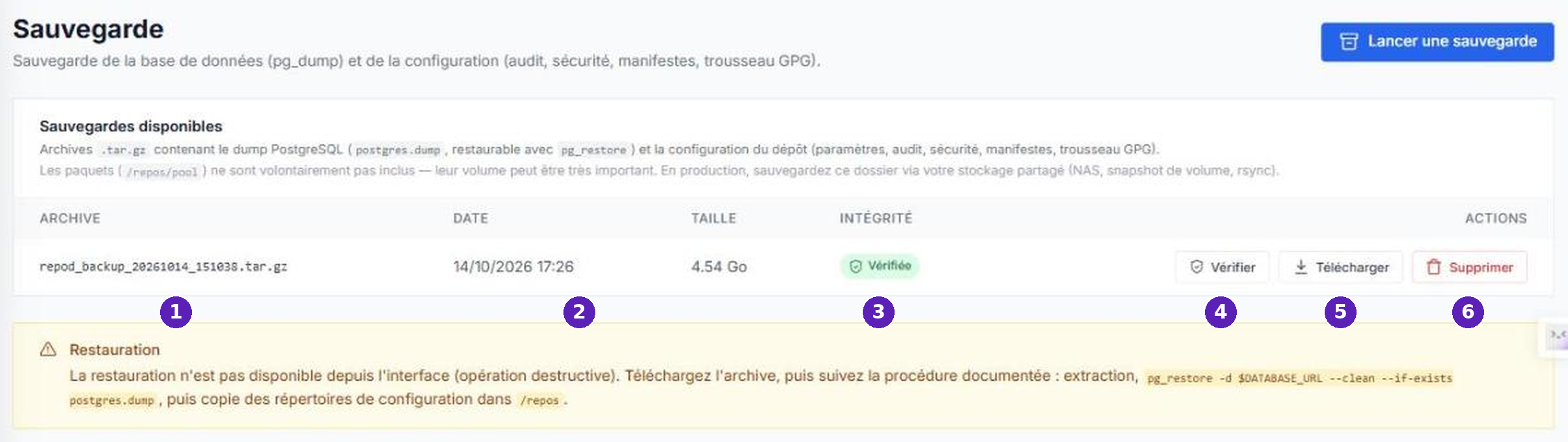
Figure 2 — A finished backup.
- Archive.
repod_backup_YYYYMMDD_HHMMSS.tar.gz, the time being in UTC. The Date column (2) is shown in your local time, which is why the two differ. - Date and size. 4.54 GB here.
- Intégrité. Vérifiée means two checks passed, run automatically right after the backup: the whole gzip stream reads to the end with a valid checksum, and
pg_restore --listreads the database dump (309 entries in the table of contents). A failed check is reported as a failed backup, never as a success. - Vérifier. Runs the same two checks again, on demand. Do it on an archive that has travelled or sat for a while.
- Télécharger. Downloads the archive through the browser.
- Supprimer. Deletes it, and its integrity record.
Verified is not the same as restored
The badge proves the archive is readable and the dump is well-formed. Only a restore proves the data is what you expect. Step 5 shows how to do that safely.
Step 4 — Schedule it, and size the retention
Open Administration → Paramètres, card Sauvegarde planifiée. Activer la sauvegarde automatique is off by default. Choose the time, and the number of backups to keep.
Set the retention from the archive size
The default is to keep 7 archives. At 4.5 GB each that is 32 GB, more than this machine has free. The retention applies after every backup, manual ones included, and deletes the oldest. Multiply the size of one archive by the number you keep, and compare with your free space.
A scheduled backup that fails is recorded in the audit log (BACKUP_CREATE, FAILURE): look there if you expect an archive that is not in the list.
Step 5 — Keep a copy elsewhere, then rehearse a restore
An archive on the same disk as the data it protects does not survive the loss of that disk. Download it, or copy it from /repos/backups, to another machine or a NAS. Encrypt it with GPG if it leaves your network: it contains your signing key and your database.
Then check that it restores. This rehearsal uses a temporary database, so your live data is never touched:
# 1. Extract only the database dump (the archive is large, this takes a couple of minutes)
mkdir -p /tmp/restore-drill
tar -xzf repod_backup_20261014_151038.tar.gz -C /tmp/restore-drill --wildcards '*/postgres.dump'

# 2. Restore it into a database created just for the test
docker exec repod-db psql -U repod -d postgres -c "CREATE DATABASE repod_restore_drill"
docker exec -i repod-db pg_restore -U repod -d repod_restore_drill --no-owner \
  < /tmp/restore-drill/*/postgres.dump

# 3. Compare with the live database
for db in repod_restore_drill repod; do
  docker exec repod-db psql -U repod -d $db -tAc \
    "select (select count(*) from users), (select count(*) from manifests), (select count(*) from inventory_clients), (select count(*) from inventory_packages)"
done

# 4. Clean up
docker exec repod-db psql -U repod -d postgres -c "DROP DATABASE repod_restore_drill"
rm -rf /tmp/restore-drill
In this chapter's rehearsal, the restore finished without error, and both databases returned the same figures: 1 user, 1269 manifests, 2 machines, 1321 inventory packages. The restore took several minutes, mostly rebuilding indexes.
Restoring for real
After a loss, the order is: stop the application, restore the database over the empty one with pg_restore --clean --if-exists, copy settings.json, gnupg/, secrets/, pool/, manifests/, security/, sboms/, maven/, pypi/, npm/, audit/, db/, dists/, conf/, rpm/ and apk/ back into /repos, and restart. Nothing has to be regenerated. The full procedure, with every command, is in Backup and restore.
Checklist
- Switch on the scheduled backup, and set the retention from the archive size.
- Copy archives off the machine, and encrypt them.
- Back up the container image storage separately.
- Rehearse a restore into a temporary database after any major change, and at least every quarter.
- Keep the GPG signing key somewhere safe on its own, as well.
What's next
- Backup and restore: the complete procedure, encryption and the
backup.shscript - Keep your data fresh and your platform running: the other scheduled jobs
- Schedule the recurring scans and mirrors: why a mirror job can delay a backup