When Repod cannot reach a machine over SSH
What you'll learn:
- How to read the status of a machine and the message behind an error
- How to tell a powered-off machine, a wrong key, a failing
sudoand a changed host key apart - How to test the connection, re-run a scan and follow it
- How to reset the stored host key of a machine that was legitimately reinstalled
Time: ~15 minutes
Prerequisites: At least one machine registered in SSH mode (see Add your first client machine). Resetting a host key needs an administrator account.
How Repod connects
For a machine in SSH mode, Repod signs in with its own key, reads the installed packages, then analyses them. Two safeguards matter when something goes wrong:
- The first time Repod connects, it records the machine's SSH host key (its fingerprint). On every later connection, it compares: if the key is different, Repod refuses to connect, so that it never talks to an impostor.
- What you see in the Statut column comes from the last scan, not from a live probe.
Step 1 — Read the statuses
Open Clients and scroll to Machines clientes.
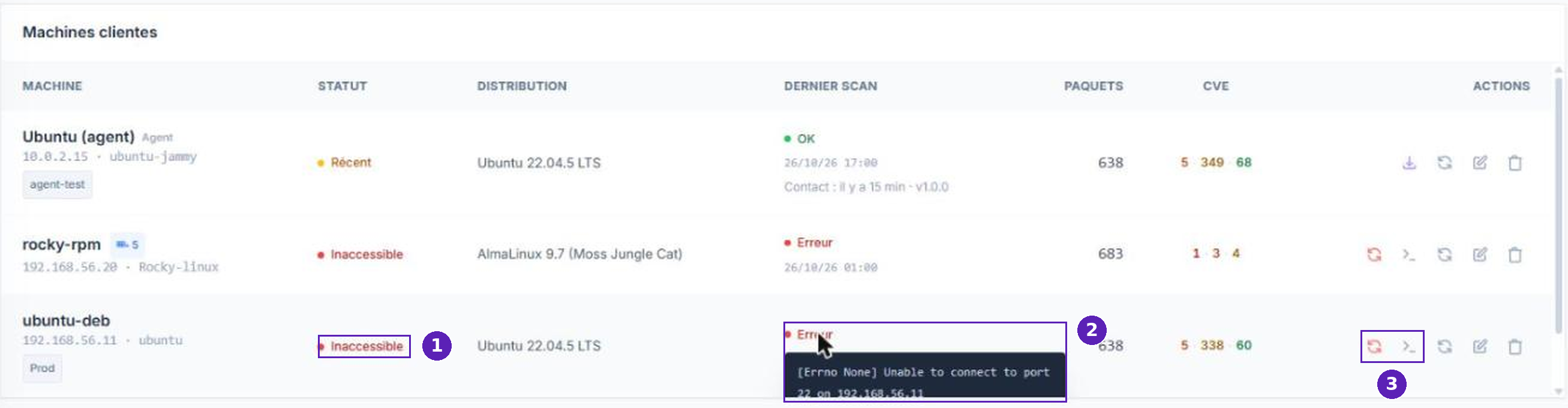
Figure 1 — The status (1), the error and its message (2) and the actions (3).
For an SSH machine, the Statut (1) is one of:
| Status | Meaning |
|---|---|
| Non testé | No scan has run yet |
| Joignable | The last scan connected and finished |
| Inaccessible | The last scan failed |
| Désactivé | The machine is disabled in Repod |
(An agent machine has its own statuses, based on its last call: see Enrol a machine with the agent.)
Rest the mouse on the red Erreur (2) in the Dernier scan column: a tooltip gives the exact message and a first hint. In this example, the machine had simply been switched off when the nightly scan ran at 01:00:
[Errno None] Unable to connect to port 22 on 192.168.56.11
Machine inaccessible — vérifiez l'IP, le firewall et le port SSH
Repod classifies the failure so that the hint fits:
| Code | Typical message | What to check |
|---|---|---|
| SSH_CONN | Unable to connect to port 22 |
The machine is on, the address and the port are right, no firewall in between |
| SSH_TIMEOUT | timed out |
A machine overloaded or a network that drops packets |
| SSH_AUTH | Authentication failed |
Repod's public key is in the authorized_keys of the SSH account |
| SSH_HOSTKEY | Fingerprint SSH inattendue … |
The host key changed: see Step 4 |
| COLLECT_FAIL | Collection failed | The account can run sudo for the package commands |
| CVE_FAIL | Vulnerability analysis failed | Read the backend logs |
| INTERRUPTED | Scan left "in progress" | Repod was restarted during the scan: run it again |
Step 2 — Test the connection
Click Tester la connexion SSH (3), the >_ icon of the row. Repod opens a connection, runs a harmless command and shows the result in a notice:
- SSH OK — hostname: ubuntu-jammy: Repod can sign in and the machine answers.
- SSH échoué : …: the notice carries the same message as the tooltip.
The test does not change the Statut: only a scan does. On our machine, the test answered SSH OK while the row still said Inaccessible, because the error came from the previous night.
Step 3 — Run the scan again
Once the connection works, click Relancer le scan (the red circular arrow, shown on rows in error). The scan starts at once.
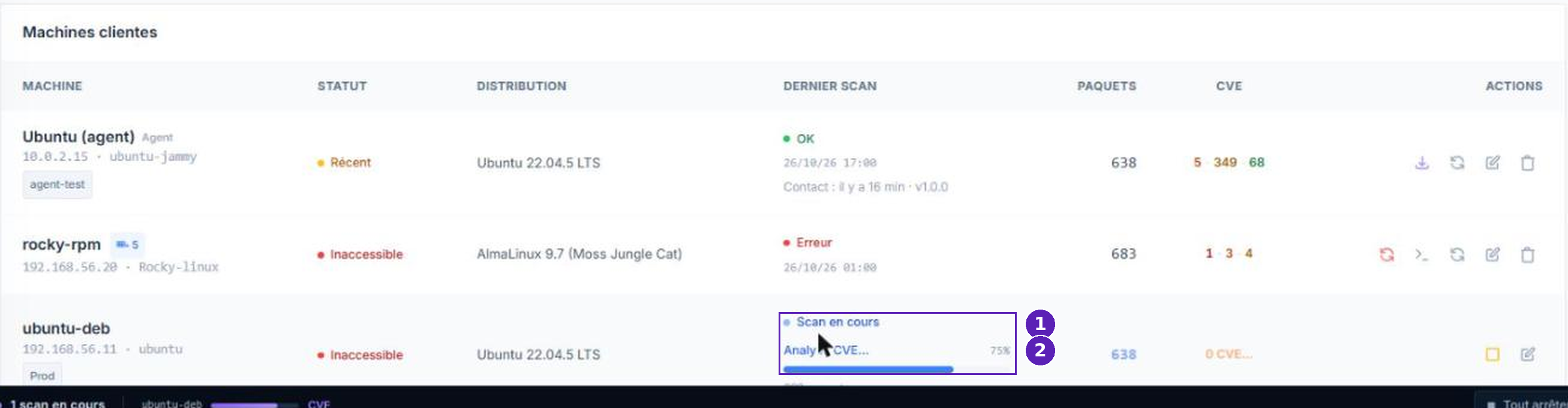
Figure 2 — The scan label and its step (1), the progress bar and the number of packages (2).
The row shows each step (connection, collection of the packages, vulnerability analysis) with a progress bar. A small bar at the bottom of the window counts the scans running and lets you stop them all. When it ends, a notice announces Scan terminé — ubuntu-deb · 638 paquets · 430 CVE, and the row goes back to green.
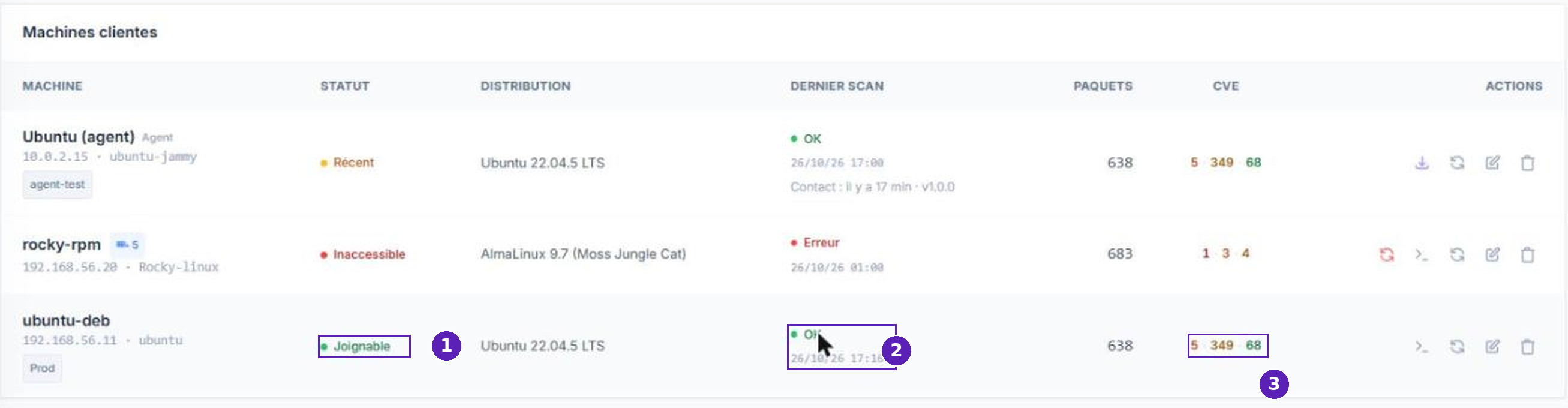
Figure 3 — The status Joignable (1), the last scan OK (2) and the counts (3).
The Statut has become Joignable. The other machine, still switched off, stays Inaccessible until it answers.
A failure at night is not a mystery
The nightly scan runs by itself (see Schedule the recurring scans and mirrors). A machine that is off at that time shows up as Inaccessible the next morning. If many machines fail at once, look at Repod's network before looking at the machines.
Step 4 — A changed host key
If the host key of a machine changes, Repod refuses to connect and reports:
This is the protection working. There are two very different causes:
- A legitimate change: the machine was reinstalled, restored from a backup, or its SSH keys were regenerated.
- A substitution: something else answers at that address.
Do not reset the key before you know which. Compare the two fingerprints. Repod's stored fingerprint is in the error message (attendu). On the machine, read its real one on the console:
If the fingerprint shown on the machine matches the one Repod received (reçu), the key really is the machine's own, and the change is legitimate. If it matches neither, stop and investigate.
Once you are sure, an administrator clicks Réinitialiser l'empreinte SSH (the key icon, shown on a row whose error is a changed host key) and confirms. Repod forgets the old fingerprint and records an entry in the audit log. The next connection stores the key the machine presents: run Relancer le scan right away, so that it stores the key you just verified and not another one.
What's next
- Add your first client machine: registering a machine and deploying Repod's key
- Enrol a machine with the agent, no SSH: for a machine Repod cannot reach
- Schedule the recurring scans and mirrors: the nightly scan behind many of these statuses